This topic has always been in demand and is also a nightmare for many Salesforce Developers. Today, I am going to help you learn how to do do the Integrations using the RESTful APIs in Salesforce.
This blog is all about the concepts of Integration and REST API to help understand the topic better and is PART-1 in the Integrations blog series. So, Stay tuned for more information and a Proof of Concepts (POC) / Demo in next parts.
Now, before we dive deep into the What is REST Api and all that other stuff that you may have head about like SOAP, Bulk APIs etc. I will make sure you understand what is Integration and what are all these heavy names related to Integration.
What is Integration?
By intergation we simply mean connecting two different applications/servers/systems over the internet for exchange of resources/data/information.
Now for Salesforce Developers, it can be either from Salesforce Org to some external application/system known as a CALLOUT or it can be from the external system to Salesforce org known as CALL IN.
What is the role of APIs in Integration?
API is the acronym for Application Programming Interface, which is a software intermediary that allows two applications to talk to each other. Each time you use an app like Facebook, send an instant message, or check the weather on your phone, you’re using an API.
To explain this better, let us take a pratical example.
Imagine you’re sitting at a table in a restaurant with a menu of choices to order from. The kitchen is the part of the “system” that will prepare your order. What is missing is the critical link to communicate your order to the kitchen and deliver your food back to your table. That’s where the waiter or API comes in. The waiter is the messenger – or API – that takes your request or order and tells the kitchen – the system – what to do. Then the waiter delivers the response back to you; in this case, it is the food.
What is RESTful API?
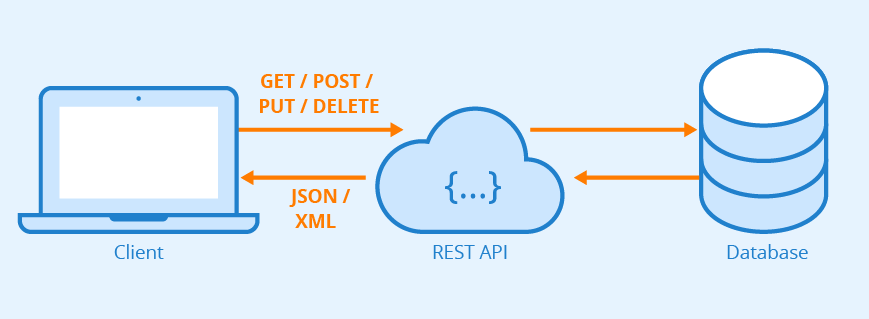
REST API provides a powerful, convenient, and simple Web services API for interacting with Lightning Platform. Its advantages include ease of integration and development, and it’s an excellent choice of technology for use with mobile applications and Web projects.
More importantly, Rest APIs work with both JSON and XML which makes it very easy to user unlike heavy SOAP API which only rely on XML.
To utilise REST API, understanding of four importent components is required:
1) URI (Uniform Resource Indentifier)
This is nothing but the endpoint URL where the resource is residing. In simply words- address of a bicycle shop where you want to go to purchase a bicycle. 😛
For callouts, it will be provided by the external system/app and for call-ins it will be something like:
https://yourSalesforceOrgsBaseUrl.my.salesforce.com/URLMapping
Don’t worry about the URL Mapping as of now, we will discuss about it in detail in Part-3 while doing Call-ins POC.
2) HTTP Methods
Now, as we know where our resource is residing, means we know its address but how to reach that address? We need a car/rikshaw/bike to reach there. Right? Means a mode of transport. So, HTTP methods facilitate the same here. They are used to reach/call the endpoint with specific requirement of ours with different methods.
Some of the HTTP Methods are:
- GET : Used to get some information from the exteral app/system’s resource.
- POST : Used to post/send some info to the exteral app/system’s resource.
- PUT : Used to update and insert the exteral resource identified by URI.
- PATCH : Used to update the exteral app/system’s resource identified by URI.
- DELETE : Used to delete the exteral app/system’s resource identified by URI.
3) Request Headers and Body
Request headers specify the metadata for the request that we want to send to the external system. For example:
Content-Type: application/json; charset = UTF-8
Accept: application/json
The request body specifies data for the request, when necessary. If there’s no data to specify, the body is omitted from the request. For example(JSON):
{
"Name" : "NewAccount1",
"ShippingCity" : "San Francisco"
}
4) Response
When we send some request to external URI, then in return would also want to know what happened to that resource and sometimes we would even require some information from them, thus REST response comes into the picture.
After processing the request sent from one system to the other, the other system sends the response back in either XML or JSON (preferred). We then need to de-serialize the response in apex(if received in JSON).
I think it has been enough for this blog and I’ll now leave it to you go through it once again becuase from in PART-2 and PART-3 of this blog, we are going to do one POC each for callout and callins and understanding of the concepts is very much important.
If you like my content, feel free to appreciate by likes and sharing my content. Also provide your valuable feedback so that I can improve and bring more useful content for you. See yaa guys!!
Amazing explanation. Most simplistic to anyone who is new to Integrations.
[…] moving on further, if you don’t know the basic of Integration in Salesforce, please read my Part-1 of the…


Leave a Reply