The Salesforce Spring ’24 release is on the horizon, promising a bouquet of exciting updates tailored specifically for developers. As we eagerly await the arrival of this transformative release, let’s delve into the heart of innovation and uncover the top 10 developer updates that are set to revolutionize the Salesforce ecosystem.
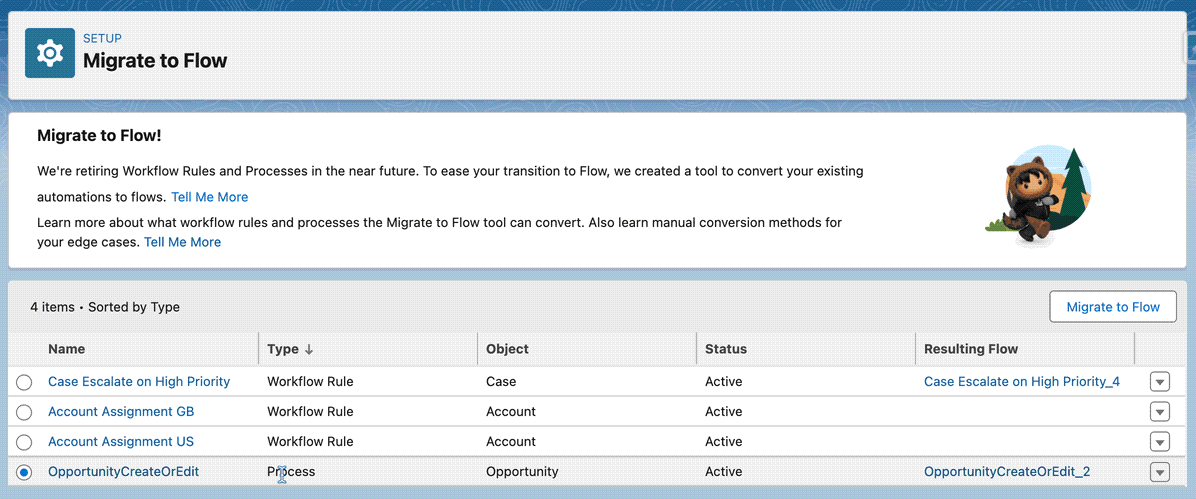
1. Migrate to Flow Tool Evolution:
The Migrate to Flow tool undergoes a significant evolution, empowering developers with the flexibility to partially migrate processes while excluding invocable actions. This enhancement not only streamlines the migration process but also ensures a seamless transition from processes to flows, minimizing the need for manual reconfiguration. Let’s dive into an example scenario to illustrate this update:
// Example scenario: Partial migration of processes using the Migrate to Flow tool
MigrateToFlowTool.partiallyMigrateProcesses('MyProcess', 'MyFlow');
2. Enhanced Lightning Navigation:
Lightning:navigation receives enhancements, offering developers greater control over post-saving navigation. By leveraging the replace property, developers can tailor the navigation experience to suit specific user interactions. Let’s explore a practical example of how this enhancement can be implemented:
// Example: Customize post-saving navigation using the replace property
var pageReference = {
    type: 'standard__recordPage',
    attributes: {
        objectApiName: 'Contact',
        actionName: 'new'
    }
};

// Navigate with replace set to true
component.find("navigationService").navigate(pageReference, true);
3. Lightning Web Components Advancements:
Lightning Web Components (LWC) witness several enhancements, including the introduction of new attributes and behaviors. Let’s take a look at an example demonstrating the usage of the wrap-table-header attribute in the lightning-datatable component:
<!-- Example: Usage of wrap-table-header attribute -->
<lightning-datatable
    key-field="id"
    data={data}
    columns={columns}
    wrap-table-header={true}>
</lightning-datatable>
4. Apex Items Update:
The Spring ’24 release introduces new classes, methods, interfaces, enums, and exceptions across various namespaces in Salesforce Apex. Let’s explore an example showcasing the usage of OAuth token validation:
// Example: OAuth token validation
Auth.Oauth2TokenExchangeHandler.validateIncomingToken('myApp', Auth.IntegratingAppType.Web, 'xyzToken', Auth.OAuth2TokenExchangeType.AccessToken);
5. ICU Locale Formats for Global Compatibility:
The adoption of International Components for Unicode (ICU) locale formats ensures culturally fitting experiences for users worldwide. Let’s delve into an example illustrating the formatting of dates, times, numbers, and currencies based on user preferences:
// Example: Formatting dates using ICU locale formats
var formattedDate = new Intl.DateTimeFormat('en-US', { dateStyle: 'full' }).format(date);
6. Visualforce JavaScript Remoting API Security Enhancement:
The Visualforce JavaScript Remoting API receives a security boost with JsonAccess annotation validation. Let’s see how this enhancement can be applied in a real-world scenario:
// Example: Applying JsonAccess annotation validation
@RemoteAction
global static String getData(String accountId) {
    // Perform data retrieval operations
    return responseData;
}
7. Data Cloud-Triggered Flows Debug Tools:
The new Data Cloud-Triggered flow debug tool facilitates testing and troubleshooting flow behavior. Let’s explore an example demonstrating the usage of this debug tool:
// Example: Debugging Data Cloud-Triggered flows
Flow.DebuggingTool.debugFlow('MyDataFlow', 'DataRecordId');
8. Beta Feature: Scratch Org Snapshots:
Salesforce introduces Scratch Org Snapshots, streamlining the replication of specific configurations across development environments. Let’s delve into an example showcasing the creation and usage of Scratch Org Snapshots:
# Example: Creating a Scratch Org Snapshot
sfdx force:org:snapshot:create --name MySnapshot --sourceorg MyScratchOrg
9. Apex REST API Enhancement: RFC 7230 Validation:
Apex REST API responses now adhere to RFC 7230 rules, ensuring consistency and compatibility with other applications. Let’s explore an example illustrating the usage of RFC 7230 validation:
// Example: Enabling RFC 7230 validation
RestContext.response.addHeader('RFC-7230-Check', 'enabled');
10. Apex REST API Defaults to JSON:
The Apex REST API defaults to returning data in JSON format when the HTTP ACCEPT header is missing or malformed. Let’s see how this change impacts API usage:
GET /services/apexrest/yourEndpoint
Accept: application/xml

Response:
{"error":"Unsupported Content-Type"}
As we anticipate the Salesforce Spring ’24 release, developers are poised to leverage these exciting updates to drive innovation and elevate user experiences. With a plethora of new features and enhancements at their disposal, developers can embark on a journey of exploration and discovery, unlocking the full potential of the Salesforce platform.
Stay tuned as we embrace the future of development with Salesforce Spring ’24!
Leave a Reply