For technical professionals entrenched in the complexities of Salesforce, efficiency and productivity are paramount. Enter Salesforce Inspector Reloaded, a browser extension poised to revolutionize your Salesforce workflow. Built upon the solid foundation of the original Salesforce Inspector, Reloaded introduces a plethora of enhancements and features designed to streamline your Salesforce journey.
Why Choose Salesforce Inspector Reloaded?
The genesis of Salesforce Inspector Reloaded was a desire for improvement and community-driven innovation. Stemming from the original extension developed by Søren Krabbe, Reloaded was born out of a need to address minor bugs and enhance functionalities. With the original developer’s support waning, the community stepped up to elevate the Salesforce experience to new heights.
Exploring the Enhanced Side Panel
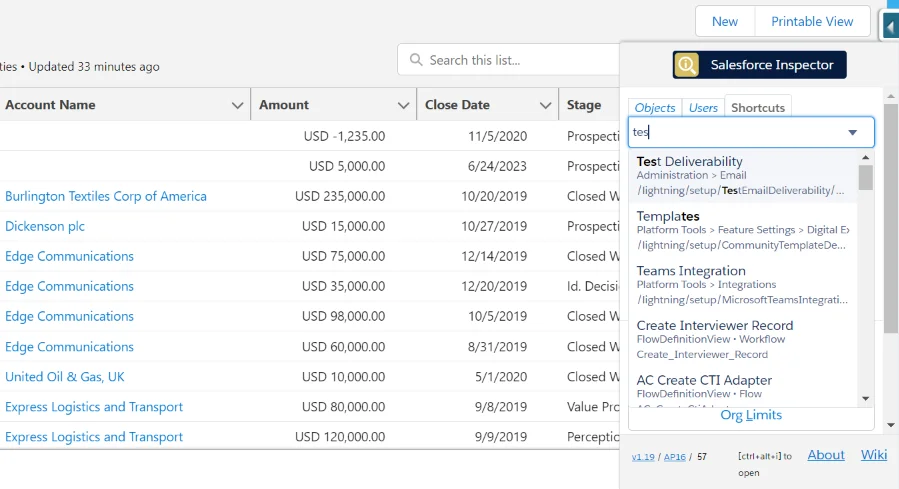
At the core of Salesforce Inspector Reloaded lies the side panel—a sleek interface seamlessly integrated into your Salesforce environment. Accessed with a simple click, this panel serves as the gateway to a world of enhanced functionalities and time-saving features.
1. Navigation Section: Navigating Made Simple
The Navigation section offers a user-friendly interface for seamless traversal across Salesforce. Whether you’re exploring Objects, Users, or Shortcuts, the Navigation section provides intuitive access to critical Salesforce components.
For example, suppose you need to quickly navigate from an account record to your role hierarchy in Setup. In that case, the Shortcuts tab within the Navigation section is your go-to destination, eliminating the need for cumbersome manual navigation.
2. Extension Pages: Unleashing Advanced Functionality
Dive deeper into Salesforce with Extension Pages, where a myriad of advanced functionalities awaits. From streamlined data export capabilities to robust querying tools, Extension Pages empower users to interact with Salesforce data like never before.
For instance, imagine you need to export Salesforce data for analysis. With the Data Export extension page, you can effortlessly query all available data, apply filters, and export them in just a few clicks.
3. Additional Extension Info: Transparency at Your Fingertips
Stay informed with vital extension details, including API versions and repository links. Transparency is key, and Salesforce Inspector Reloaded ensures users have access to essential information at all times.

Shortcuts: Turbocharge Your Navigation
Shortcuts redefine efficiency by providing direct access to Setup pages and beyond. Gone are the days of navigating through layers of menus; with Shortcuts, users can swiftly access the desired item with a simple search and click.
For example, suppose you need to check your deployment status while on an account page. In that case, the Shortcuts tab allows you to search for the relevant Setup page and access it immediately, eliminating unnecessary loading times and clicks.

User and Object Tabs: Precision at Your Fingertips
The User and Object tabs empower users with granular control and insights into Salesforce data. From user details to object configurations, Salesforce Inspector Reloaded puts the power in your hands, facilitating informed decision-making.
Suppose you need to access details pertaining to a specific Salesforce object, such as custom settings or custom metadata types. In that case, the Object tab provides a streamlined solution, allowing you to swiftly retrieve the information you need, regardless of your current location within Salesforce.

Staying Up-to-Date: Seamless API Version Updates
In a rapidly evolving ecosystem, staying current is essential. With Salesforce Inspector Reloaded, updating the API version is a breeze, ensuring compatibility and performance optimization with the latest Salesforce releases.
For example, imagine Salesforce releases a new update with enhanced features and functionalities. With Salesforce Inspector Reloaded, users can manually update the API version directly from the side panel, ensuring they stay ahead of the curve.

Data Import and Export: Streamlined Efficiency
Data import and export functionalities receive a significant boost with Salesforce Inspector Reloaded. From auto-detecting SObjects to skipping unknown fields, the import process is streamlined, fostering efficiency and accuracy.

Suppose you need to import data into Salesforce from an external source, such as Excel. In that case, Salesforce Inspector Reloaded’s auto-detect feature automatically updates the SObject and action type based on the export header, simplifying the configuration process.

Sharing and Collaboration: Foster Connectivity
Collaboration is made effortless with Salesforce Inspector Reloaded’s sharing capabilities. Whether sharing queries or insights with colleagues or the broader Salesforce community, connectivity is at the core of Reloaded’s ethos.
For example, imagine you’ve crafted a complex query that could benefit your team members. With Salesforce Inspector Reloaded, you can easily share the query directly from the extension, fostering collaboration and knowledge sharing among team members.
UI Restyling: Aesthetic and Functional Harmony
A visually appealing interface enhances the user experience, and Salesforce Inspector Reloaded delivers just that. With UI restyling and improved accessibility, navigating Salesforce becomes not only efficient but also enjoyable.
For instance, imagine accessing the “Show all data” page within Salesforce Inspector Reloaded. With the new SLDS style page, users are greeted with a visually pleasing interface that enhances usability and ensures a seamless experience.

Security: Protecting Your Assets
Security is paramount in today’s digital landscape, and Salesforce Inspector Reloaded prioritizes safeguarding your data. With features like restricted access and API client whitelisting, users can mitigate risks and ensure compliance with organizational security policies.
Suppose your organization requires restricted access to Salesforce Inspector Reloaded to specific users, such as admins or power users. In that case, you can easily configure API client whitelisting to restrict access and mitigate potential security risks.

With Salesforce Inspector Reloaded, technical professionals can unlock the full potential of Salesforce, streamlining workflows, and driving productivity to new heights. Embrace the future of Salesforce productivity with Salesforce Inspector Reloaded.
Leave a Reply